
Remote jobs with direct applications connect you from a job listing to an employer’s application process, rather than leaving you at a general search page. Before applying, check that the employer and role match the application, then review location eligibility, employment terms, and required experience. A remote label alone doesn’t tell you whether a position fits your location, schedule, or skills, and a polished listing doesn’t prove it is legitimate. This guide explains how to assess role requirements, set focused search alerts, verify the employer and listing, and spot warning signs such as requests for money or sensitive information too early. Use these checks to focus on credible openings in fields such as customer support, data entry, technology, digital marketing, and virtual assistance.
Key Takeaways
- Match the employer and role details to the application, and review location and employment terms before applying.
- Use focused filters and alerts to surface openings that fit your preferred role, work location, and schedule.
- Compare required qualifications with your experience, separating essential skills from useful extras.
- Watch for requests for money or sensitive information before legitimate onboarding begins.
Checking job and employer details
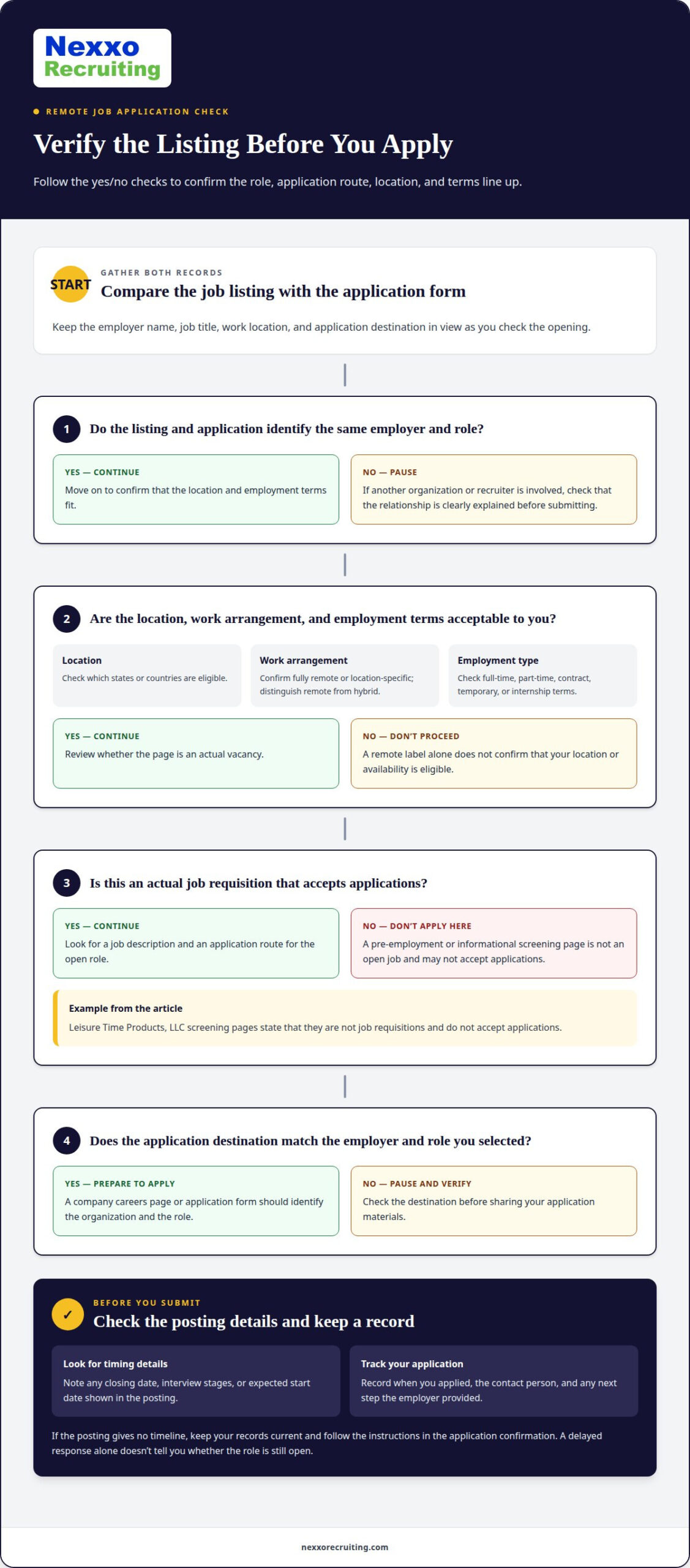
Match the hiring organization’s name and the role title across the listing and application form. If the listing names one employer but the form identifies another organization, pause before submitting. The application may be handled by a recruiter or other entity, so check that the relationship is clearly explained. Review the employer name, job title, work location, and application destination together.
Read the full posting before applying. Confirm which locations are eligible, whether the role is fully remote or location-specific, and what employment terms apply. Note whether the position is full-time, part-time, contract, temporary, or an internship. These details can affect eligibility even when the job title matches your experience. For example, a remote position restricted to certain locations may not accept applicants who live elsewhere.
- Confirm the application destination: The form should identify the same hiring organization and role shown in the listing.
- Check location and terms: Record eligible locations, work arrangement, and employment type before you start the application.
- Identify screening material: Look for wording that separates an actual vacancy from pre-employment or informational content.
That distinction matters. Leisure Time Products, LLC pre-employment screening pages state that they are not job requisitions and do not accept applications. A screening page is not an open role. Look for an actual job description and application route before sharing your materials.
Hiring timelines vary by employer and role. Check the posting for a closing date, interview stages, or expected start date, and use those details to plan your follow-up. Track when you applied, the contact person, and any next step the employer provided. If there is no timeline, keep your records current and follow the instructions in the application confirmation. A delayed response alone doesn’t tell you whether the role is still open.
Job search filters and alerts
Remote job boards and company career pages both list openings with employer application routes. Look for listings that link to the organization’s careers page or application form. On a company career page, open the jobs section and filter by remote work, department, or role title. Search phrases such as “remote customer support” or “remote data entry” can narrow results to relevant roles.
Set filters around conditions you can accept, not just job titles. Choose your eligible location, then filter by remote work, employment type, and experience level when those options are available. Add skill terms such as CRM, customer service, or data entry. A remote label may still come with location limits, so check each result’s work-location details before saving it.
- Role: Select a job family, then add a specific title or skill.
- Location: Choose your eligible state or country, and distinguish remote from hybrid.
- Employment type: Filter for full-time, part-time, contract, or temporary work that fits your availability.
- Application route: Look for listings that identify the employer and link to its application page.
Build alerts around a few precise searches. For example, create separate alerts for “remote customer support” and “remote CRM specialist” instead of combining unrelated titles. If alerts return broad results, remove a general term or add a relevant skill. If results are too narrow, broaden the title while keeping your location and work-arrangement requirements.
When an alert arrives, review the posting date, role details, and application destination before saving it. Keep a brief tracking list of the employer, title, source, and application status. This makes duplicate listings easier to spot and helps you prioritize new openings. Filters for application routes can speed up your search, but still check that the destination matches the role you selected.
Job types and experience requirements
Remote openings with salary details span customer support, data entry, virtual assistance, technology, and digital marketing. Some entry-level roles welcome applicants without directly related job titles, especially when employers value transferable skills such as clear writing, accurate data entry, or customer communication. Search for “entry-level” and “no experience required,” then read the duties and qualifications. The label alone doesn’t show whether training or prior experience is expected.
When searching for remote jobs that don’t require experience, focus on listings that describe tasks you’ve already handled. Customer support roles may value service experience, while data entry work may emphasize accuracy and spreadsheet skills. Match examples from school, volunteer work, or previous jobs to each stated requirement. Don’t assume every remote opening is designed for beginners.
For example, Viatris lists a part-time remote Student Worker position that requires enrollment in a relevant graduate degree program. Qualifications include advanced Excel skills, such as PivotTables, Power Query, Power Pivot/DAX, formulas, VBA/macros, and dashboards. Python, SQL, and Power Automate are useful additional tools. English proficiency in speaking, comprehension, reading, and writing is also required. Separate required qualifications from useful extras before deciding whether to apply.
- Entry-level: Check the stated training and baseline skills.
- Junior: Compare the role’s scope with your practical experience.
- Mid-level: Look for responsibility and specialized skill requirements.
- Senior: Assess the depth of expertise the position expects.
- Lead-level: Review the leadership and decision-making duties.
These categories can help frame comparisons, but they don’t establish universal expectations. Employer, responsibilities, location eligibility, and expertise all affect role requirements. If you’re moving from customer service into CRM operations, for example, highlight relevant systems experience and reporting tasks rather than relying on your job title alone.
Search for entry-level remote customer support, data entry, and virtual assistant roles, including listings labeled “no experience required.” Check each posting’s duties and qualifications, since the label alone doesn’t guarantee that prior experience or training isn’t expected.
Avoiding job scams
Requests for money are a clear stop signal during hiring. Never pay an application, interview, training, equipment-release, or cryptocurrency fee to get a job. A recruiter who says payment is required to schedule an interview or release a laptop is asking you to pay for access to employment. Don’t send money or continue with the payment process.
Be cautious if a recruiter quickly moves the conversation to encrypted chat or asks for money. A change in communication channel alone doesn’t prove fraud, but an immediate move combined with a payment request is a serious warning. Pause the exchange and avoid sharing personal or financial details. Keep the listing and messages so you can compare the recruiter’s claims with the stated application process.
- Payment demand: Stop if someone requests an application, interview, training, equipment-release, or cryptocurrency fee.
- Fast channel change: Be cautious when a recruiter immediately shifts the conversation to encrypted chat, especially with pressure to act.
- Early data request: Don’t provide sensitive identity or banking data before legitimate onboarding.
Protect your identity and banking information until you reach a legitimate onboarding stage. An application may request professional details, but scrutinize any request for sensitive data before the hiring steps are clear. For example, don’t send bank account details to someone who has only contacted you through chat. Keep your documents in your possession and share them only through the employer’s legitimate onboarding process.
If a message combines a vague job offer, immediate pressure, and a fee, stop and reassess before responding. Compare the recruiter’s claims with the original listing and application details. If the role or employer identity changes during the conversation, don’t treat the new request as an ordinary next step. A legitimate hiring process shouldn’t require payment to get the job, and an early request for banking data isn’t a reason to rush.
Nexxo Recruiting
Nexxo Recruiting features remote job listings in customer support, data entry, technology, digital marketing, and virtual assistance. Use them to compare role details and find openings with direct application links. Each post includes information to help you assess the position and decide whether it fits your experience before applying.
Use the listings as part of a focused search. Review each role’s requirements, eligible locations, and employment terms, then follow its application link if it matches your criteria. Nexxo Recruiting connects you with openings; you decide whether to apply based on your fit for each role.
Contact Nexxo Recruiting to explore remote job listings that match your interests.
Make your next application count
Choose a role that moves your career in a clear direction, not just one with a remote label. Before applying, decide which responsibilities you want to handle, which skills you want to build, and what work arrangement suits you. That focus gives each application a purpose and helps you avoid spending time on openings that don’t match your goals.
As you pursue remote jobs with direct applications, organize your search around the roles and experience you want to develop. Nexxo Recruiting’s listings cover several fields, giving you a place to explore options as you plan your next move. Decide whether to apply based on the role’s details and how well they fit your experience.
Take the next step at your pace. Contact Nexxo Recruiting to discuss your remote job search and explore relevant listings. A focused search can help you move toward work that fits your skills and professional goals.
Frequently Asked Questions
Which companies are hiring for remote jobs in the United States?
Remote openings change as jobs are posted and filled, so use current listings rather than relying on a fixed employer list. Nexxo Recruiting features remote opportunities in customer support, data entry, technology, digital marketing, and virtual assistance. Use a listing to identify the hiring organization, then review its careers page for current openings and role details before applying.
What remote job boards link directly to employer application pages?
Nexxo Recruiting listings include direct application links for posted positions. For remote jobs with direct applications, check that the link leads to the employer’s application page or hiring system, not another search-results page. Confirm that the role and organization on the destination match before entering your information. This helps connect your application to the opportunity you selected.
How can I verify a remote job posting is legitimate and avoid scams?
Compare the role information with the employer’s careers page, and stop if the job or hiring organization changes without explanation. Treat requests for application, interview, training, equipment-release, or cryptocurrency payments as warning signs. Don’t provide sensitive identity or banking information before legitimate onboarding. An unexpected request for bank details during an initial chat, for example, is a reason to end the exchange.
What filters help find fully remote U.S. jobs rather than hybrid roles?
Choose “remote” as the work arrangement and set the location filter to the United States or your eligible state. Exclude hybrid and on-site options when the platform allows it, then read the work arrangement in each posting. Search terms such as “fully remote” can narrow results, but the listing’s location and attendance details determine whether the role suits your needs.
How do I apply for remote jobs directly on an employer’s website?
Open the employer’s careers page, find the specific role, and follow its application instructions. Prepare a resume tailored to the listed responsibilities, then complete the required fields consistently with your documents. Before submitting, review the role title and employer name on the form. Save the confirmation message or application reference to track your submission and respond to follow-up steps.
Are direct applications more effective than applying through job boards?
Neither route guarantees a stronger result. Applying directly to an employer can remove an extra navigation step, while a job board can help you find openings across employers. When pursuing remote jobs with direct applications, focus on whether your experience fits the role and your materials address its requirements. Follow the route in the listing, submit a focused application, and keep track of where you applied.