
Accuracy is essential in alphanumeric data entry jobs that let you work from home, along with steady typing, careful data processing, and the ability to follow instructions. Tasks may include entering customer or order details, updating spreadsheets, checking records for errors, and transcribing information. Speed matters only when you can maintain accuracy. Before applying, review the skills employers require and the tasks involved. This guide explains how typing, Excel, data processing, and transcription fit into the work, and what to consider when assessing a role.
Key Takeaways
- Prioritize clean, consistent entry over raw speed, and practice meeting any typing threshold listed for a role.
- Build confidence in Excel by organizing records, checking entries, and handling large data sets accurately.
- Review each remote project’s task scope and requirements so you can assess whether the work matches your skills.
- For transcription tasks, focus on capturing names, numbers, and other details faithfully while keeping your work organized.
Applicant accuracy and typing speed
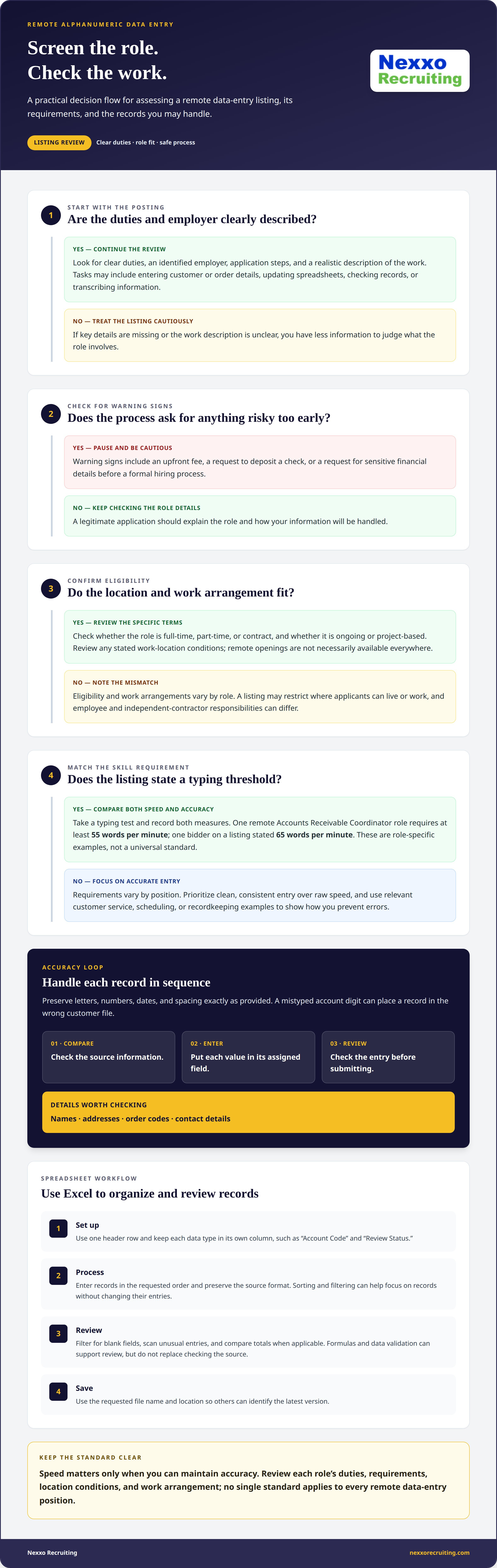
Remote data entry often involves entering customer and order information into company systems. Accuracy means preserving letters, numbers, dates, and spacing exactly as provided. A mistyped account digit, for example, could place a record in the wrong customer file. Check each field in sequence: compare it with the source, enter the value, then review it before submitting. This is especially important when handling names, addresses, order codes, and contact details.
Experience and qualifications vary by role. Some listings emphasize accurate entry and basic computer skills; others ask for administrative experience or familiarity with specific systems. Read the requirements closely before applying. If you have not held a data entry job, relevant examples from customer service, scheduling, or recordkeeping can still demonstrate your skills. Explain what records you handled and how you worked to prevent errors.
Typing speed requirements also vary by position. A remote Accounts Receivable Coordinator role requires at least 55 words per minute, while one bidder on a listing stated a speed of 65 words per minute. These figures are role-specific examples, not a universal standard. A useful test measures both pace and accuracy. If you type quickly but miss characters, slow down and focus on clean entry before increasing speed.
Follow the listing’s application instructions, and prepare for a typing test by practicing timed passages and reviewing your error patterns. Choose a quiet workspace, close unrelated tabs, and practice on the keyboard layout you expect to use. Include mixed content, such as a name, email address, order number, and date, because alphanumeric entry combines text and digits.
- Complete a short typing test and record both speed and accuracy.
- Practice correcting errors without losing your place in a record.
- Before submitting an application, match your examples to the listed duties and requirements.
Location may affect eligibility, along with accuracy, experience, and typing requirements. One remote customer service role, for example, requires applicants to live in Kentucky or Indiana. Check each listing for location conditions before applying, and don’t assume that every remote opening is available everywhere. Eligibility varies by role.
Excel and data processing
Excel can help you organize records, find values, and keep information consistent. In alphanumeric data entry jobs you can do from home, a spreadsheet might use separate columns for customer names, account codes, dates, and status. Add clear headers such as “Account Code” and “Review Status.” Keeping each data type in its own column makes records easier to scan and update.
Sorting and filtering help you focus on particular records without changing the entries themselves. For instance, filter a “Status” column to find incomplete records, then sort by date to review items in sequence. A basic formula can calculate totals or flag values for attention, while data validation can restrict a field to approved choices. These tools support accurate processing, but they don’t replace checking the source information.
Remote tax accountant work offers a practical example of data entry. One role involves entering and verifying tax data while processing a high volume of records. The work may include transferring figures, checking required fields, and correcting mismatches before records move forward. Follow the task’s formatting instructions: a date in the wrong format or a number in the wrong column can affect later review.
- Set up: Use one header row and keep each data type in its own column.
- Process: Enter records in the requested order and preserve the source format.
- Review: Filter for blank fields, scan unusual entries, and compare totals when applicable.
- Save: Use the requested file name and location so others can identify the latest version.
Practice with a small sample table before working with a larger file. Enter names, dates, codes, and statuses, then sort and filter the records. Check that rows stay intact and formulas reference the right cells. When reviewing alphanumeric data entry jobs you can do from home, look for terms such as Excel, spreadsheet updates, data verification, and processing volume. These details help you judge the spreadsheet work involved.
Remote alphanumeric data entry project
Alphanumeric data entry means transferring information that combines letters and numbers into a digital record. A task might involve entering a person’s name beside an account code, then adding a date or status in the assigned field. Follow the required format and preserve the source details. A project listing may also specify that the work is remote, meaning it can be done away from the employer’s workplace.
Remote data entry may be full-time, part-time, or contract work, depending on the employer and assignment. The listing should explain the arrangement, expected schedule, and whether the role is ongoing or project-based. Review these terms before applying. A contract project with a defined task differs from a scheduled employee role, even if both involve entering customer or business records.
U.S. tax and employment rules for remote workers depend on whether you’re classified as an employee or an independent contractor, as well as where you live and work. Review the offer’s classification and work-location requirements to understand your responsibilities. Don’t assume every remote position uses the same arrangement.
No single average pay figure describes all work-from-home data entry jobs. Compensation varies with duties, location, experience, schedule, and employment type. Compare roles with similar responsibilities and review the compensation terms in each listing rather than relying on a broad average.
Look for a job posting with clear duties, an identified employer, application steps, and a realistic description of the work. Be cautious if someone requests an upfront fee, asks you to deposit a check, or seeks sensitive financial details before a formal hiring process. A legitimate application should explain the role and how your information will be handled.
- Match the project’s listed tasks to your skills, such as entering names, codes, and dates.
- Confirm whether the arrangement is full-time, part-time, or contract before applying.
- Pause if an application asks for money or sensitive financial information upfront.
Rates vary across listings: the remote HR Administrative Assistant role in Reading, Pennsylvania, lists 20.00 – 22.00 per hour, while the remote Business Analyst role in Seattle, Washington, lists 50.00 – 57.00 per hour.
Typing and transcription skills
Alphanumeric data entry means recording combinations of letters and numbers, such as “AB2047” in an account field. Transcription means converting spoken or recorded material into written text. General data entry is broader and can include entering, updating, sorting, or checking information in digital records.
Remote alphanumeric work requires accurate typing, attention to field labels, and confidence using a computer keyboard. You’ll also need a computer and internet connection to access instructions and submit records. If the role includes audio transcription, a headset can help you hear names and numbers clearly.
Small character differences matter. In a code such as “OZ105,” the letter O can be confused with zero, while “I” and “1” may look similar in some fonts. Follow the task’s source format, preserve punctuation, and avoid guessing when a character is unclear. Transcription adds listening skills: replay a segment when a spoken name or number is difficult to distinguish.
- For codes: Enter letters, digits, and separators in the assigned order.
- For audio: Capture names and numbers faithfully, then replay unclear sections.
- For records: Keep the source material visible while entering each field.
Build a practice routine using realistic material. Type a short mock record with a name, email address, reference code, and date. Compare each character with the source and correct any mismatch. For transcription practice, type a short recording, then review punctuation, proper names, and number formats. These exercises help develop the attention needed for both text entry and audio-based work.
Before applying, read the task description for terms such as “transcription,” “record entry,” or “data verification.” Those details show whether the position centers on audio, structured fields, or a mix. Match your application examples to the stated work, such as accurately recording order codes or transcribing meeting notes. Browse remote job listings to find roles that match your typing and transcription strengths.
Nexxo Recruiting
Nexxo Recruiting lists remote job opportunities for entry-level job seekers, including data entry and customer support roles. Use the listings to compare actual job details with your skills, preferred schedule, and work arrangement. Each post includes position information and a direct application link, so you can review the duties before applying.
For alphanumeric data entry roles, compare the stated tasks, required skills, location limits, and application steps. This helps distinguish spreadsheet work from transcription or customer record updates, so you can focus on roles that fit your experience. Nexxo Recruiting’s listings make it easier to review relevant openings and decide which applications to pursue.
If you’re ready to explore your options, contact Nexxo Recruiting.
Choose Your Next Application
Turn your research into a focused application plan. Target roles that match the tasks you can perform and the work arrangement you want. Tailor each application to the position’s stated duties and qualifications rather than relying on a broad job title. This gives your search a clear direction.
Alphanumeric data entry jobs that let you work from home may appear under different titles. Review the responsibilities to understand what each position involves. Nexxo Recruiting lists remote openings for job seekers, giving you a place to compare opportunities with your goals.
When you’re ready to take the next step, Contact Nexxo Recruiting. Keep your applications targeted, describe relevant experience clearly, and move forward at a pace that works for you.
Frequently Asked Questions
Where can I find legitimate remote alphanumeric data entry jobs?
Start with remote job listings that explain the role and provide a direct application path. Nexxo Recruiting features remote openings, including data entry opportunities for entry-level job seekers. Before sharing personal details, review each posting’s duties, employer information, location requirements, and application instructions. Check that the description explains what records you’ll handle and how to apply.