
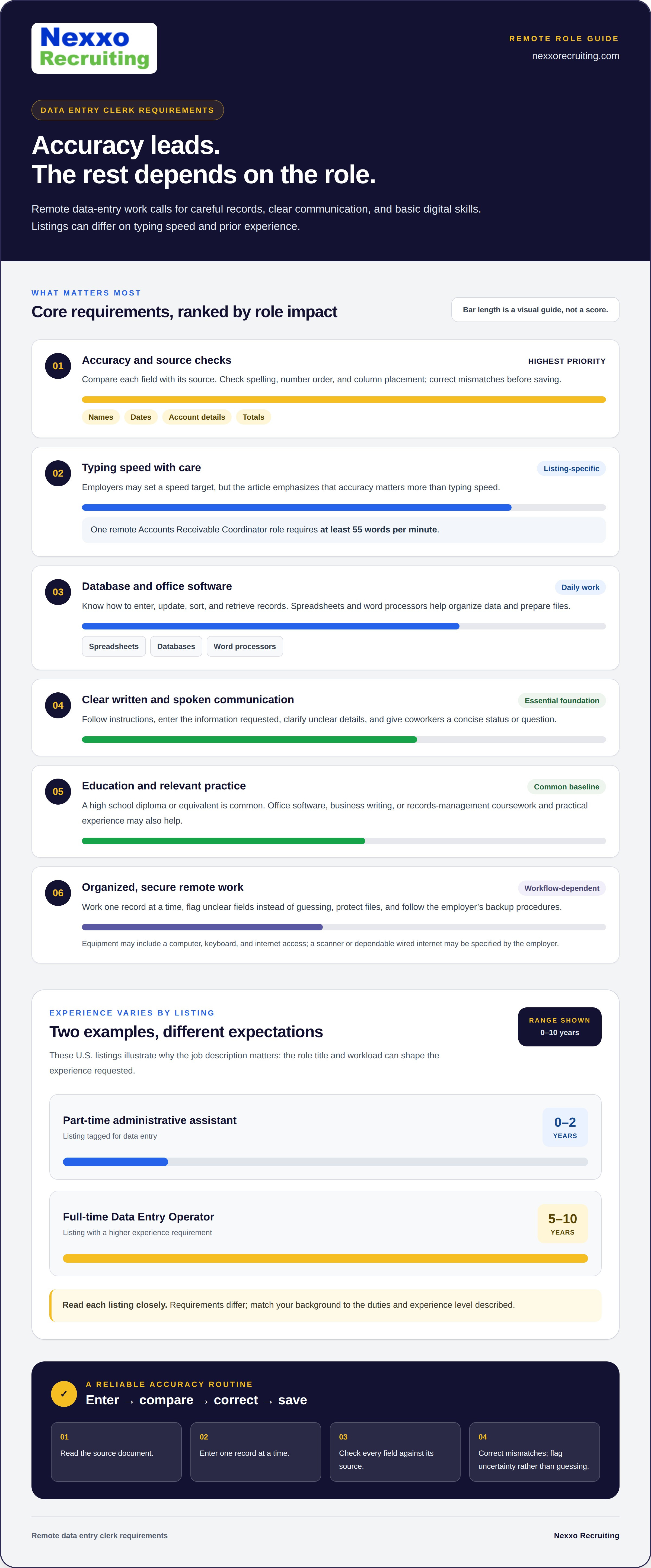
Remote data entry clerk job requirements typically include a high school diploma or equivalent, accurate typing, clear written communication, attention to detail, and comfort with spreadsheets and databases. The work can involve entering or updating records, organizing files, and checking entries against source documents. Experience expectations vary: some U.S. part-time administrative assistant listings tagged for data entry ask for 0-2 years, while a full-time Data Entry Operator listing asks for 5-10 years.
Key Takeaways
- Understand the records, files, and database tasks a remote data entry clerk may handle.
- Identify how education, clear communication, and basic software skills factor into role requirements.
- Learn why careful data checks and organized work habits matter for accurate records.
- See how experience expectations differ across remote listings and assess which roles fit your background.
What does a Data Entry Clerk do?
A data entry clerk moves information into digital records and keeps those records organized. The source could be a paper form, customer details, or an existing electronic file. Common tasks include entering new information, updating records, retrieving requested data, and sorting documents after entry. For example, a clerk might transfer a customer address from a form into a database, then update it when corrected information arrives.
Employers look for fast, accurate typing, but expectations depend on the role. One remote Accounts Receivable Coordinator role requires at least 55 words per minute. Accuracy matters alongside speed: compare each entry with its source document and correct mismatches before saving the record. A fast typist who skips that check can introduce errors into a customer file or spreadsheet.
Basic database knowledge helps you work with records, not just type text. You should know how to enter, update, sort, and retrieve information. For example, a clerk might combine separate records in one table, then sort them by a requested criterion. Word processors and spreadsheets, including Microsoft Word and Excel, are also useful for preparing files and organizing data.
Consider a practical example: paper forms need to become searchable customer records. The clerk enters each form’s details, checks the entries against the originals, and sorts the completed records. The result is an organized digital file colleagues can retrieve. A data manager or senior data team member typically oversees the work, while a document controller may help ensure accuracy.
Remote data entry requires a computer, keyboard, and internet access for online systems and workplace communication. A scanner may be needed to digitize paper documents. Clerks should also know basic computer hardware and peripherals such as printers and scanners. Equipment and connection needs depend on the employer’s workflow; a listing may specify requirements such as dependable wired internet.
Confidentiality is essential when handling customer and business records. Follow the employer’s procedures for protecting files and making regular backups. These steps help preserve data and keep records available when needed. The role combines careful typing, basic database operations, and organized digital file handling.
Education and communication skills
A high school degree or equivalent is a common baseline for data entry clerk roles. Employers may also value coursework or practical experience in office software, business writing, or records management. These skills help you follow written procedures and handle information accurately. A spreadsheet assignment, for example, can show that you understand rows, columns, and consistent data entry. Requirements vary by listing, so read each description closely.
Clear written English matters because data entry often relies on instructions, forms, and messages. You need to understand what a field requests and enter the matching detail without changing its meaning. If a customer provides an unclear address, a clerk may need to ask courteously for clarification. Keep the exchange focused on the missing detail. Clear wording helps prevent assumptions from becoming inaccurate records.
Spoken English and customer service skills are useful when interacting with customers and coworkers. A caller may provide information that needs to be entered in a customer record. Listen carefully, confirm key details when needed, and enter the information in the correct fields. This keeps communication focused and helps colleagues understand the record. A professional tone matters, especially when correcting or clarifying a customer’s information.
Remote work makes concise communication especially useful. A supervisor may send written instructions about a data format or a change to the entry process. Read the full message, identify the requested action, and reply with a clear status or a specific question. If two fields seem to request the same detail, for example, ask which field should contain it. This reduces unnecessary back-and-forth and keeps work aligned with instructions.
When preparing for the role, match your education and communication examples to each listing. A high school credential addresses a stated baseline; a class project can demonstrate careful written work. In an application or interview, describe a specific task, the steps you took, and the result. For instance, explain how you followed a form’s instructions and organized its information in a spreadsheet. Keep your claims factual, direct, and relevant to the listed duties.
Attention to detail
A data entry clerk may create spreadsheets with many figures, and accuracy matters more than typing speed. Treat names, dates, account details, and totals as separate fields. Compare each field with its source document. A quick scan of the finished sheet can miss a transposed digit or misplaced entry.
Use a consistent review process after entering information. Start with the source document, then check the corresponding fields in the digital record. Confirm spelling, number order, and that each value is in the correct column. If a value in the record differs from the source, correct it before moving on. This helps prevent errors from carrying into later work.
For example, a paper form contains a customer’s contact details and account number. The clerk enters them into a spreadsheet, then compares each field with the form. The account number differs by one digit. The clerk corrects it against the original, bringing the digital record in line with its source. That comparison is the core accuracy check.
Sorting and combining records also require careful review. When compiling separate files into one table, keep each record’s details together. After sorting by a requested criterion, check nearby rows for misplaced information. If a name appears beside another customer’s address, for instance, compare both records with their source files before saving the updated table.
Work systematically instead of relying on memory. Complete one record, check it against its source, then continue. If an instruction or source document is unclear, flag the uncertain field rather than guessing. For example, resolve a hard-to-read character in an account number before treating the entry as complete. This process supports accurate records and dependable handoffs to colleagues.
Experience levels for remote data-entry roles
Experience expectations vary by title and workload. A U.S. part-time administrative assistant listing tagged for data entry lists 0-2 years of experience. A U.S. full-time Data Entry Operator listing asks for 5-10 years. These examples show why a job title alone can’t tell you whether a role suits your background. Treat remote data entry clerk job requirements as specific to each listing.
For entry-level roles, show evidence that matches the listed duties. A class assignment, volunteer task, or previous office responsibility can demonstrate how you handled records. Explain the situation, your actions, and the result. For example, describe organizing event registrations, correcting duplicate entries, and producing a usable attendee list. Keep the example accurate and specific.
Listings that ask for more experience may expect broader responsibility or familiarity with established workflows. Match your past tasks to the posting rather than relying only on job titles. If you maintained records in another role, identify the systems, information types, and review steps involved. This helps employers assess relevant experience, even if your previous position had a different title.
Compare the remote data entry clerk job requirements with your background and the role’s actual duties. Separate required qualifications from preferred ones, then prepare a relevant example for each key task. If you lack experience requested for a role, emphasize related responsibilities without overstating them. The listings above illustrate a range, not a universal standard for every remote data entry job.
To spot possible scams, assess whether the employer, duties, and application process are clearly described. Be cautious if a recruiter pressures you to share sensitive personal information before explaining the role or gives instructions that seem suspicious. Compare messages with the original listing, and pause if names, duties, or application instructions conflict.
Apply based on how well the duties match your background, not on the title alone. If you have limited formal experience, present relevant examples; if you have more, explain how your background fits the stated workflow. Read each listing closely and prepare truthful examples. A focused search helps you prioritize opportunities that align with your skills and experience.
Nexxo Recruiting
Nexxo Recruiting helps you move from understanding role requirements to reviewing remote job opportunities. Its listings include data entry roles, details about each opening, and direct application links. Use them to compare a position’s duties and experience expectations with your skills.
As you review a listing, look for the specific tasks, required experience, and application instructions. Match those details to your background, then decide whether the role fits. If you’re building experience, focus on openings whose stated requirements align with your current skills and relevant examples.
For example, if you’ve handled spreadsheet records but haven’t held a data entry job title, consider listings that describe similar duties. Read each role’s requirements before applying, and use its application link to follow the employer’s process. Contact Nexxo Recruiting if you’d like help finding relevant remote job listings.
Set a focused application plan
Turn your understanding of remote data entry clerk job requirements into a focused search. Choose role types that match your skills, then assess each listing’s duties and application process. Concentrate on positions where you can clearly explain your interest and relevant experience.
Before applying, prepare a concise account of relevant work or coursework. Identify the task, the steps you followed, and what the work produced. Keep your examples accurate and adapt them to each posting. This helps you present your qualifications directly without overstating your experience.
Nexxo Recruiting organizes remote job listings so candidates can review openings and their details. Use each listing to decide which opportunities fit your goals and which application to complete next. A deliberate approach keeps your search practical and organized.
Ready to take the next step? Contact Nexxo Recruiting and continue exploring opportunities that fit your skills.
Frequently Asked Questions
What qualifications are required for remote data entry clerk jobs?
Start with the qualifications named in the specific posting, since employers set criteria for each opening. Separate required items from preferred ones before applying. If the role mentions handling sensitive records, prepare an example of how you followed workplace privacy procedures. In your application, address each required qualification directly and avoid claiming skills or credentials you can’t support.
What computer skills and software do remote data entry clerks need?
Expect to work within the employer’s approved digital workflow, which may include web-based forms or internal record systems. Read field labels and instructions carefully, and follow naming and file-saving conventions. For instance, a team may require consistent labels for submitted records. Familiarity with software helps, but adapting to an employer’s specific setup is part of learning the role.
Do remote data entry jobs require a high school diploma or college degree?
Education criteria depend on the individual opening, so use the job description as your guide. If an application asks about education, provide the relevant credential or coursework accurately. A college degree should not be assumed to be necessary for every position. Focus on the education level the employer actually requests rather than adding unrelated details.
Do remote data entry clerks need prior experience or certifications?
Each employer sets its own experience and certification criteria, so read the qualifications section before applying. If you lack a requested credential, don’t imply that you hold it. Instead, identify related training or responsibilities that genuinely match the role. For an experience requirement, describe the scope of your past work and the procedures you followed, keeping your account factual.
What are typical remote data entry clerk duties and daily tasks?
Daily workflows often depend on how an employer assigns and reviews incoming work. A clerk may receive a queue, process assigned items, record completion status, and flag exceptions for a supervisor. For example, an incomplete submission can be routed for clarification rather than marked complete. Use the task descriptions in the listing to understand the specific role.
Are remote data entry clerk jobs commonly full-time, part-time, or contract?
The examples include both part-time and full-time listings. A remote Accounts Receivable Coordinator role is described as a six-month project.